Windows 9 Professional PreActivated (Eng/x64/Single Link) May 2014 (5.11 GB)


မၾကာေသးမွီကမွ အသစ္ထြက္လာတဲ့ Windows 9 Professional PreActivated ကို တင္ေပးလိုက္ပါတယ္။ အသစ္ေတြကိုမွ စိတ္၀င္စားတဲ့ သူငယ္ခ်င္းေတြအတြက္ တကယ္ကို အၾကိဳက္ေတြ႕ေစမွာပါ။ အခု အသစ္ထြက္ထားတဲ့ Window 9 က အရင္ က Window 8.1 ထက္ ပိုျပီး ဒီဇိုင္းလန္းပါတယ္။ က်ေနာ္လည္း ေသျခာေတာ့ မသံုးၾကည့္ရေသးပါဘူး။ အခုမွ ေဒါင္းျပီး သံုးစမ္းၾကည့္မလို႕ပဲ။ စိတ္၀င္စားတဲ့ သူငယ္ခ်င္းမ်ား လည္း ေဒါင္းနိုင္ေအာင္လို႕ မူရင္းမွ ျပန္လည္ တင္ေပးလိုက္ပါတယ္။

ပါဝင္တဲ့ေဆာ့ဝဲေတြကေတာ့>>>>>

Bit Torrent 7.8.2 Build 30417
CCleaner Professional 4.08.4428
CPU-Z 1.68
Adobe Flash Player ActiveX 12
Aimp Player 3.55
Adobe Reader 11.4
Adobe Flash Player 12.0.235
Autorun Virus Remover v3.3
Boot Screen Win9 By DiLshad Sys
Firefox 28 Final
Glary Utilities 4
DirectX32
FileZilla FileZilla 3.8.0
Notepad++ 6.5
Skype 6.11.0.102
GOM Player 2.2.57.5189
Hotspot Shield 3.37
Internet Explorer 11 Final X64
Internet Download Manager 6.12 Final
.NET Framework Version AIO
K-Lite Codec Pack 10.15 (Full)
Ultra ISO 9.8.1
USB Disk Security 6.2.0.432
Team Viewer 9
USB Safely Remove 5.2 Final
VLC Media Player 2.1.3
Visual C++ 2008 SP1 Redis
Microsoft Silverlight 5.1.10411.0 Final x64
Java Runtime Environment 1.7.0.45
Visual C++ 2005 Redis
Visual C++ 2005 SP1_Redis
Winrar 5.0
Visual C++ 2010 Redis
Visual C++ 2012 Redis
Visual C++ 2008 Redis

Themes included in windows 9

12 New Themes

Whats' New in this version??

Disable Tool Tips
Disable Autorun Drive
Disable UAC
Disable Hibernate
Don't mark new applications
On Right Click Freeware Sys
Copy to Move to on right click
Boot Win 9 Edition
Advanced user accounting
New Eye catching themes
Hang time ratio improved
Clear type view
New icon sets
New Sound schemes
New Registry settings
Added best shortcut styles
Improved application interface
Add desktop icon settings
Enable AVALON effects
Added RUN on start menu
Add change theme
Add change wallpaper
Enable Clear Type Tuning
Enable DVD in media player
Enable Glass Effect(WDM) without graphics card
Enable MP3 Encoding on right click
Enable slow motion windows effects
Enable status bar in notepad
Get rid of windows mail splash
Give your self permission to modify all
Grant full admin control
DiLshad Sys Site direct link from right click (Firefox needed)
Removed Action center Icon
Windows speed tweaking
Wait to kill service - 2000
Low level hooks time out - 1000
Hang application time out - 1000
Menu show delay - 0
No low disk space warning
Process Schedule 1st Program
Mouse Speed Increased
Hang Ratio Decreased
Fast Shut Down And Login
Down Power After Shut Down
Touch Screen Feature Added
Grant Admin control on Right Click
Add Admin Tools on Desktop Context Menu
Add manage on Desktop Context Menu
Add Move to Folder on Desktop Context Menu
small Taskbar Icon
Removed mail Splash
Detailed Shut Down And Login
Blocked Negative DNS Entery
turn Off System Beep
Turn off low Disk
Add Copy To Folder on Desktop Context Menu
Add Task Manager on Desktop Context Menu
Add Take Ownship on Desktop Context Menu
Add Register and Unregister to .dll OCX Context Menu
500ms Delay Aero
Larger Taskbar Previews
Removed Action center icon

စိတ္၀င္စားရင္ေတာ့ ဒီေအာက္ကလင့္မွာ ေဒါင္းယူနိုင္ပါတယ္ဗ်ာ။ ဖိုင္ဆိုဒ္ကေတာ့ 5.11GB ရွိပါတယ္။ ေဒါင္းျပီး Prower Iso နဲ႕ USB သို႕မဟုတ္ DVD ထဲသို႕ Bootable လုပ္ျပီး အသံုးျပဳနိုင္ပါျပီ

Size : 5.1 Gb
Version : Professional
Languange : English
Medicine : Include - PreActivated
OS Support : Win 9 x64 Bit
Type File : Rar/ISO
Code File : 9pro.may2014
Password : No
Updated : 6 May 2014
Publisher : Microsoft/MOD


ေအာက္မွာ Screenshot နဲနဲၾကည့္သြားလိုက္ပါဗ်ာ။ လန္းခ်က္ 9+++


အားလံုးအဆင္ေျပပါေစ.......။

iOS အတြက္ "Gmail" App ကို Google က Update အသစ္ထပ္မံ ထုတ္ေပးလိုက္ပါၿပီ..


Version 3.1.4159 အျဖစ္ ထြက္လာတဲ့ update မွာ အဓိကအားျဖင့္ Google ရဲ႕ Cloud service ျဖစ္တဲ့ Google Drive နဲ႔ Gmail ကို တိုက္႐ိုက္ ခ်ိပ္ဆက္ အလုပ္လုပ္ေဆာင္ႏိုင္ၿပီး အျခားေျပာင္းလဲမႈ အခ်ိဳ႕ကိုလည္း ေတြ႕ရပါတယ္..

Google Drive လို႔ ေခၚတဲ့ Cloud Storage ကို Gmail ရွိသူတိုင္း မိမိရဲ႕ mail password နဲ႔ပဲ ဝင္ေရာက္ အသံုးျပဳႏိုင္ပါတယ္။
Gmail SignUp လုပ္လိုက္တာနဲ႔ Cloud Storage 15GB Free ရရွိၿပီးသား ျဖစ္လို႔ Google Drive ထဲမွာ မိမိရဲ႕ Files, Photos စတာေတြကို သိမ္းထားႏိုင္ပါတယ္။ လိုအပ္ရင္ေတာ့ Cloud Storage ကို ထပ္မံ ဝယ္ယူႏိုင္ပါတယ္။

ယခု update လုပ္ေပးလိုက္တဲ့ Gmail မွာ Drive ထဲမွာ သိမ္းထားတဲ့ Photos, Documents ေတြကို တိုက္႐ိုက္ ေပးပို႔ႏိုင္သလို မိမိထံေရာက္လာတဲ့ စာနဲ႔အတူ တြဲလာတဲ့ Attachment files ေတြကိုလည္း Drive ထဲကို တိုက္႐ိုက္ သိမ္းႏိုင္ပါတယ္။ ဒီနည္းလမ္းေၾကာင့္ iDevice ေတြရဲ႕ Storage ကို သက္သာေစပါတယ္။


Gmail App မွာ မိမိရဲ႕ Profile ပံုကို စိတ္ႀကိဳက္ ေျပာင္းႏိုင္ပါတယ္။ အျခား Gmail account မ်ားကိုလည္း Hide လုပ္ထားႏိုင္ၿပီး လိုအပ္တဲ့အခါမွာ ျပန္လည္ ျပသထားႏိုင္ပါတယ္။


Gmail App ကို App Store မွာ Free Download ရယူ Update လုပ္ႏိုင္ပါၿပီ.. 

အစဥ္မေျပနိဳင္ပါ။ႏုိင္ငံျခားဇာတ္ကားမ်ားႀကည့္ခ်င္တယ္ဆုိရင္www.lwansaung1.comကိုသြားႏုိင္ေလ့
လာႏုိင္ပါတယ္ဇာတ္မ်ားကုိအသစ္တင္တုိင္းႀကည့္ခ်င္တယ္ဆုိရင္page ေလးကုိသြား
ေရာက္ျပီးLikeထားလုိက္ပါအသစ္တင္တုိင္း ေအာ္တုိ ့ေရာက္ေစမွာပါ.
.အားလုံးအဆင္ေျပပါတယ္။။ 

Automatically install via Windows Update (8)


ေကာင္းမယ္ထင္လုိ ့တင္ေပးလုိက္တာပါ...ကြ်န္ေနာ္ကေတာ့ သူမ်ားေတြလုိဆရာႀကီးလည္းမပာုတ္ပါဘူး
အဂၤလိပ္စာကုိလည္း ကြ်မ္းကြ်မ္းက်င္က်င္ ဖတ္မတတ္ပါဘူးခ္ခ္ ေကာင္းမယ္ထင္ရင္ ကုိတုိင္အရင္လု ပ္
ႀကည့္ျပီး တင္ေပးလုိက္တာပါပဲ.....ကဲသူငယ္ခ်င္းတုိ ့စိက္၀င္စားရင္ေအာက္မွာ ေလ့လာႀကည့္မယ္
အရမ္းအဆင္ေျပတယ္ေနာ္...ပုံေလးနဲ ့တစ္ကြ ရွင္းျပထားတာပါ ဘယ္လုိလုပ္ဘယ္လုပ္သြားရမယ္
ဆုိတာေလးေတြကုိေပါ့...ကြ်န္ေနာ္ကေတာ့ စာမဖတ္ဘူးသူျပထားတဲ့ပုံေလးလုိ ့လုိက္လုပ္တာပါပဲ မပ်င္း
မေနေပါ့....ခ္ခ္ အဲ့လုိေလ့လာျခင္းကလည္း မိမိတုိ ့ဘ၀အတြက္ျဖစ္သလုိ အမ်ားက်ိဳးကုိလည္းမ်ွေ၀ေပး
ႏုိင္တာေပါ့......

he first major update for Windows 8.1 is finally here. Much like a service pack for older versions of Windows, it expands on the system, making improvements to existing features and security issues, while including some significantly new functions. Take a look at our installation guide below to make sure that you get all the critical updates for Windows 8.1 Update 1. You can install Windows 8.1 Update 1 in two ways: automatically via Windows Update, or manually. We'll go through both options below.

Automatically install via Windows Update

1. Open Windows Update
Windows update
2. Select and install all Important updates
Windows 8.1 Update 1 is not offered as a single package, but consists of several separate updates. The Windows Updater will only gives you the first file, which can be identified as KB2919442. After installing this update and restarting your system, you can gradually find the other files you'll need to install. Tip: Open the Windows Updater until you no longer see any new updates; this will ensure that you actually installed all the individual files.
Make sure you've installed all the Important updates

Manually install Windows 8.1 Update 1

As mentioned, Windows 8.1 Update 1 consists of individual smaller updates that you have to install one after the other in a specific order. Depending on your version of Windows, there are separate updates for 32 bit and 64 bit.
1. Identify your version of Windows
Using the search function, find System Information.
System information
This will open the System Information window containing important system data. Here, you can see if you're running Windows with 32-bit (x86) or 64-bit (x64).
System information
2. Install the first update: KB2919442
Before the actual Windows 8.1 update, you have to install the pre-update, identified as KB2919442. Download the file and start the installation by double clicking on it. After a reboot, you'll be able to continue with the update.
3. Download individual updates for Windows 8.1 Update 1
The following links will take you to Microsoft's overview page. You can download all single updates at once to save yourself some time.
Microsoft Download Center
Choose which updates to download
4. Install each individual update
Install each update by double-clicking in the following order, reboot your computer, and you'll be all set with the latest update to Windows 8.1
  • KB2919355
  • KB2932046
  • KB2937592
  • KB2938439
  • KB2934018
Windows Update installer

Windows 7 -ဖ်က္ပစ္"လုိ႕မရတဲ့ files ႏွင့္ folders ကုိ ဖ်က္နည္း


ကြန္ျပဴတာ အသုံးျပဳသူတုိင္ တစ္ခါတစ္ရံ ျဖစ္ေလ့ျဖစ္ထရွိတက္ပါတယ္..အဲဒါကေသာ
Internet ထဲမွ မိမိ Download လုပ္တဲ့ files ႏွင့္ folders တစ္ခ်ဳိ႕ကုိ.."ဖ်က္ပစ္"လုိ႕မရပဲ..
Computer ထဲမွာ Locks ျဖစ္ေနတက္ပါတယ္။

အဲဒီအခါမွာ..အလြန္ပင္..စိတ္အေႏွာက္အယွက္ျဖစ္မိပါတယ္။
အဲဒီလုိျဖစ္လာခဲ့တဲ့အခါမွာ.. Computer အသုံးျပဳေနသူ တစ္ခ်ဳိ႕က
(Unlocker Software) ကုိ အသုံးျပဳျပီး.."ဖ်က္ပစ္"ၾကရပါတယ္။

တကယ္လုိမ်ား မိမိမွာ (Unlocker Software) မရွိခဲ့ဘူးဆုိလုိ႕ရွိရင္လဲ..
ဖ်က္ပစ္လုိ႕ရတဲ့နည္းရွိပါတယ္။အဲဒါက...........
ပထမဦစြာ.. Windows Task Manager ကုိသြားျပီး..
Processes ေအာက္မွာ ရွိေနတဲ့..explorer.exe ကုိ အရင္ဦးစြာ ပိတ္လုိက္ရမယ္..ေအာက္မွာျပထားတဲ့ ပုံပါအတုိင္း..တစ္ခုျခင္း..ေသခ်ာေအာက္လုိက္လုပ္ပါက..အဆင္ေျပသြားပါမယ္။
(သတိ) မိမိဖ်က္လုိတဲ files ႏွင့္ folders ကုိ command prompt မွာနာမည္ေရးတဲ့အခါ..မမွားေစနဲ..
.အၿခားေသာ ဖုိင္းနာမည္ကုိေရးမိရင္..အဲဒီဖုိင္းပဲ အဖ်က္ခံရလိမ္မယ္..ဒါေၾကာင့္ မမွာေစနဲ႕..
ကြ်န္ေတာ္ကုိယ္တုိင္လဲ..ဖ်က္ျပစ္တာ..ေအာင္ျမင္းခဲ့တဲ အတြက္ေၾကာင့္မုိ႕..ျပန္လည္မွ်ေ၀လုိက္ပါတယ္။

1. - Open an elevated command promptStart > Search "cmd" > Right Click cmd.exe > Run as Administrator


2. - Leave Command prompt open; Open task manager


3. - End process "explorer.exe"


4. - Switch back to command prompt


 5A. - FILE - Change to the directory of your file and delete it.First run this line: cd "PATH OF YOUR FILE" i.e. cd "%USERPROFILE%"\Downloads"
Now run this line: del filename.extension
i.e. del filename.mkv
5B. - FOLDER - Delete the folder.
Enter Command: RD /S /Q [DRIVE:]\PATH\TO\FOLDER
i.e
RD /S /Q C:\Users\[username]\Downloads\FOLDERNAME

6. - Switch back to task manager


7. - Restart "explorer.exe"


Aung Swe
Sources:
Windows7-Undeletable File Delete
အစဥ္မေျပနိဳင္ပါ။ႏုိင္ငံျခားဇာတ္ကားမ်ားႀကည့္ခ်င္တယ္ဆုိရင္www.lwansaung1.comကိုသြားႏုိင္ေလ့
လာႏုိင္ပါတယ္ဇာတ္မ်ားကုိအသစ္တင္တုိင္းႀကည့္ခ်င္တယ္ဆုိရင္page ေလးကုိသြား
ေရာက္ျပီးLikeထားလုိက္ပါအသစ္တင္တုိင္း ေအာ္တုိ ့ေရာက္ေစမွာပါ.
.အားလုံးအဆင္ေျပပါတယ္။။ 

သံုးစြဲသူမ်ား မသိရိွေသးသည့္ Google ၏ လုပ္ေဆာင္ခ်က္မ်ား


ၿပီးခဲ့သည့္ႏွစ္က Google တြင္ ရွာေဖြမႈေပါင္း ၂,၁၆၁,၅၃၀,၀၀၀,၀၀၀ ျပဳလုပ္ခဲ့ေသာ္လည္း သံုးစြဲသူမ်ားမွ အံ့အားသင့္ဖြယ္ေကာင္းသည့္ Google ၏ လုပ္ေဆာင္ခ်က္ အမ်ားစုကို သိရိွၾကျခင္း မရိွေသးေပ။ ထို႔ေၾကာင့္ သံုးစြဲသူမ်ားအတြက္ အက်ိဳးရိွေစမည့္ Google ၏ လွ်ိဳ႕ဝွက္လုပ္ေဆာင္ခ်က္မ်ားကို ေဖာ္ျပလုိက္ပါသည္။

(၁) သံုးစြဲသူ၏ ညစာအတြက္ Google က ကူညီ ဆံုးျဖတ္ေပးႏိုင္သည္။

(၂) Google ကို timer တစ္ခုအေနျဖင့္ အသံုးျပဳႏိုင္သည္။


(၃) ေနထြက္ခ်ိန္ႏွင့္ ေနဝင္ခ်ိန္ အတိအက်ကို Google က ေဖာ္ျပေပးႏိုင္သည္။


(၄) “Zerg Rush” ဟုေခၚေသာ hidden ဂိမ္းကို Google တြင္ ကစားႏိုင္သည္။


(၅) ၿမိဳ႕အမည္၏ ေနာက္တြင္ “forecast” ကို ႐ိုက္ထည့္ျခင္းျဖင့္ သက္ဆိုင္ရာ ၿမိဳ႕၏ ရာသီဥတု အေျခအေနကို သိရိွႏိုင္သည္။


(၆) “site:” keyword ကို အသံုးျပဳၿပီး သက္ဆိုင္ရာ ဝက္ဘ္ဆိုက္၏ ရွာေဖြမႈ ရလဒ္မ်ားကို သိရိွႏိုင္သည္။ ဥပမာ အေနျဖင့္ Google တြင္ “site:myanmarinternetjournal.com MPT” ဟု ႐ိုက္ထည့္ပါက အင္တာနက္ဂ်ာနယ္ ဝက္ဘ္ဆိုက္ေပၚရိွ MPT ႏွင့္ သက္ဆိုင္သည့္ သတင္းမ်ားကို ရွာေဖြႏိုင္သည္။


(၇) ေန႔လယ္စာ/ညစာ အတြက္ ကုန္က်စရိတ္ တြက္ခ်က္ရာတြင္ တစ္ဦးခ်င္းစီအလိုက္က်သင့္မည့္ ေဘာက္ဆူးကိုလည္း တြက္ခ်က္ႏိုင္သည္။ ထို႔အျပင္ ရာခိုင္ႏႈန္းႏွင့္ စားသံုးသူ အေရအတြက္ကိုလည္း ခ်ိန္ညိႇႏိုင္သည္။


(၈) ေလေၾကာင္း ခရီးစဥ္ အေျခအေနကို Google တြင္ စစ္ေဆးႏိုင္သည္။


(၉) Google တြင္ “do a barrel roll” သို႔မဟုတ္ “tilt” ကို ႐ိုက္ထည့္ၿပီး ေနာက္ေျပာင္မႈမ်ား ျပဳလုပ္ႏိုင္သည္။


(၁၀) သံုးစြဲသူ ႏွစ္သက္သည့္ show ကို ၾကည့္႐ႈႏိုင္မည့္ အခ်ိန္အား Google က ေဖာ္ျပေပးႏိုင္သည္။


(၁၁) ႐ုပ္ရွင္ ဇာတ္ကားသစ္ ျဖန္႔ခ်ိမည့္ ေန႔ကို Google တြင္ သိရိွႏိုင္သည္။


(၁၂) ကုမၸဏီမ်ား၏ အခ်က္အလက္မ်ားကို Google က ေဖာ္ျပေပးႏိုင္သည္။


(၁၃) ႏွစ္သက္ရာ တီးဝိုင္းအဖြဲ႕မ်ား၏ သီခ်င္းမ်ားကို Google တြင္ ရွာေဖြႏိုင္သည္။


(၁၄) Google images တြင္ “Atari Breakout” ဟု ႐ိုက္ထည့္ကာ ၁၉၇၆ ခုႏွစ္က Atari ကုမၸဏီက ဖန္တီးခဲ့သည့္ Breakout ဂိမ္းကို ကစားႏိုင္သည္။


(၁၅) Google တြင္ အတိုင္းအတာ အကြာအေဝးကို ေျပာင္းလဲတြက္ခ်က္ႏိုင္သည္။


(၁၆) သံုးစြဲသူ မသိရိွသည့္ ဘာသာစကားမ်ားကိုလည္း Google က ဘာသာျပန္ေပးသည္။


(၁၇) သံုးစြဲသူ ႏွစ္သက္သည့္ စာေရးဆရာ ေရးသားထားေသာ စာအုပ္မ်ားကို Google က ေဖာ္ျပေပးႏိုင္သည္။


(၁၈) Facebook ေပၚတြင္ ေတြ႕ျမင္ရသည့္ ဓာတ္ပံုတစ္ပံု၏ မူလရင္းျမစ္ကို သိရိွလိုသည့္အခါ Google တြင္ ရွာေဖြႏိုင္သည္။ ထို႔အျပင္ Google ၏ Reverse Image Search ကို အသံုးျပဳၿပီး ဓာတ္ပံုကို search tool သို႔ drag-and-drop ျပဳလုပ္ၿပီး ဓာတ္ပံု၏ မူလရင္းျမစ္ တည္ေနရာကို ရွာေဖြႏိုင္သည္။


(၁၉) Google တြင္ ရွာေဖြမႈမ်ားအတြက္ keyboard ျဖင့္ ႐ိုက္ထည့္ျခင္း ျပဳလုပ္သည့္အခါ ၿငီးေငြ႕လာပါက microphone icon ကိုႏွိပ္ၿပီး ႏႈတ္ျဖင့္ ေျပာဆိုကာ ရွာေဖြမႈ ျပဳလုပ္ႏိုင္သည္။


http://www.myanmarinternetjournal.com/content/13959


HUAWEI EMMC လဲျခင္း

 
credit to-foneclub

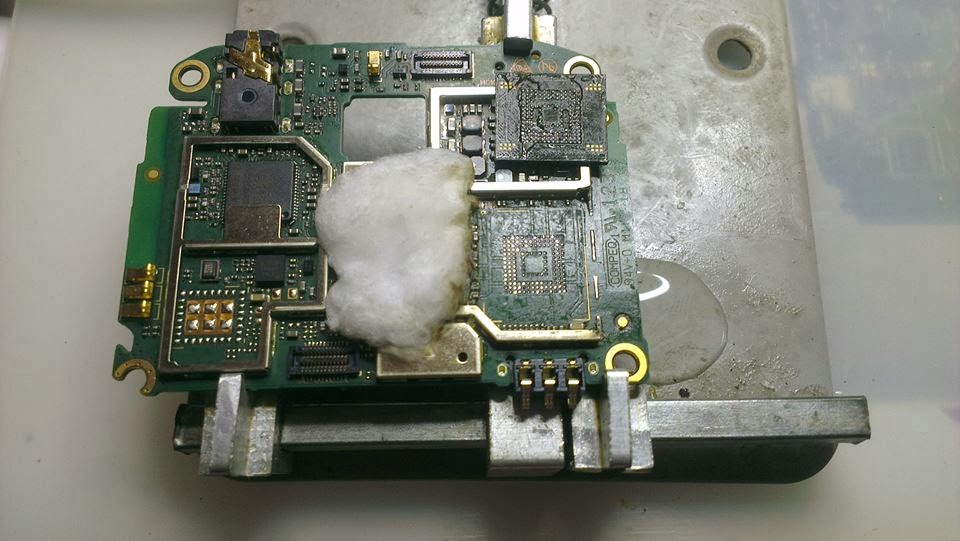
Huawei C8812 ျပဳတ္က်ျခင္း၊ ေရ၀င္ျခင္းမရွိဘဲ အလုိအေလ်ာက္ Power ေသၿပီး Power Supply ႏွင့္ခ်ိတ္၍ Power ခလုတ္ႏွိပ္လုိက္လွ်င္ 40mA တြင္ ရပ္ေနလွ်င္ EMMC IC ေၾကာင့္ျဖစ္သည္။ EMMC လဲရမည္သိလ်က္ႏွင့္ မည္သုိ႕လဲရမည္ကုိ မသိေသးသူမ်ားအတြက္ ဤ Post အား တင္ေပးလိုက္္ပါသည္။က

Step-1 ၀ါဂြမ္းကို BGA ေကာ္ခၽြတ္ေဆးစြတ္၍ EMMC ကို ထိထိမိမိ ဖံုးအုပ္ထားပါ။ ၿပီးလွ်င္ Circuit အား Zip အိတ္ျဖင့္ မိနစ္(၂၀)ခန္႕ ေလလံုေအာင္ပိတ္ထားပါ။

Step-2 EMMC ေဘးကပ္လ်က္တြင္ CPU ရွိသည္။ EMMC ျဖဳတ္ေနခ်ိ္န္တြင္ CPU ခဲလြတ္သြားႏုိင္သည္။ ထုိ႕ေၾကာင့္ ၀ါဂြမ္းကို ေရစြတ္၍ CPU ေပၚတြင္ ဖံုးအုပ္ထားပါ။ (သံျပားႏွင့္ဖံုးအုပ္ထားလွ်င္ စိတ္မခ်ရ၍ ၀ါဂြမ္းကုိ ေရစြတ္သံုးရျခင္းျဖစ္သည္။)

Step-3 အပူခ်ိန္ကုိ 370 (ေလမႈတ္Gun တစ္လံုးႏွင့္တစ္လံုး အပူခ်ိန္မတူပါ၊ ခဲေပ်ာ္မွတ္ေရာက္သည္အထိ ခ်ိန္ညွိပါ၊) ေလကို 5,6 ေလာက္ထားပါ။

Step-4 EMMC ပတ္၀န္းက်င္က Componentမ်ား ခဲေပ်ာ္၊မေပ်ာ္ ဇာဂနာႏွင့္ စမ္းၾကည့္ပါ။ ခဲေပ်ာ္လွ်င္ EMMCကို စတင္ခြာလို႕ရပါၿပီ။ ခြာေသာအခ်ိန္တြင္ ပံုပါ No.23ဓါးျဖင့္ IC ႏွင့္ Circuit ၾကားသို႕ ထိုးထည့္ၿပီး ျဖည္းညွင္းစြာ ကလန္႕ပါ။ ကလန္႕ေသာအခ်ိန္တြင္ စိတ္ရွည္ရပါမည္။ တစ္ေနရာတည္းကို မကလန္႕ပါႏွင့္။ အထက္၊ေအာက္ မွ်၍ ကလန္႕ေပးပါ။

Step-5 EMMC ခြာၿပီးလွ်င္ Circuit ေပၚရွိ ငုတ္မ်ားျပဳတ္ေနတတ္သည္။ထိုငုတ္မ်ားသည္ အလုပ္လုပ္ေသာ ငုတ္မ်ား ဟုတ္၊မဟုတ္ မွန္ဘီလူးျဖင့္ အၾကမ္းဖ်င္း စစ္ေဆးႏုိင္ပါသည္။ အလုပ္လုပ္ေသာငုတ္မ်ား မဟုတ္လွ်င္ EMMC IC အသစ္တစ္လံုး လဲလွယ္ေပးပါ။

အားလံုးေအာင္ျမင္ၾကပါေစ။ ေက်းဇူးတင္ပါသည္။


နည္းပညာမ်ားစာေပးဖတ္တတ္သူမ်ားကေတာ့ www.lwansulay.com ကိုသြားႏုိင္ေလ့လာႏုိင္ပါတယ္
ဇာတ္မ်ားကုိအသစ္တင္တုိင္းႀကည့္ခ်င္တယ္ဆုိရင္ page ေလးကုိသြားေရာက္ျပီး Like ထားလုိက္ပါ
အသစ္တင္တုိင္း ေအာ္တုိ ့ေရာက္ေစမွာပါ..အားလုံးအဆင္ေျပပါတယ္။။
ေနာက္ဆံုးတင္ခဲ့ေတာ့ပို႕စ္မ်ား

Template information

Random post

bg
Get the Flash Player to see this player. Shoutcast & Icecast Server

Popular Posts

မန္ဘာ၀င္ရန္